GoMobile – Mobile Fare
Your Hampton Roads Transit experience is easy with GoMobile, our mobile fare system. Pay your fare, plan your trip and save money, all in one app – It’s that easy!
3 Easy Ways to Pay
With GoMobile, you can pay your fare in three easy ways.
- On the app: Use the GoMobile app to create virtual cards, plan your trip, see real-time bus info, and more.
- With a reloaded GoMobile card: Purchase a GoMobile card at any of our transit centers, Ticket Vending Machines or authorized retailers, then load it at any of our authorized load locations with cash or via card payments. You can also load it at our transit centers and Ticket Vending Machines!
- Use your debit/credit card or phone: Just in town for the weekend? Use your credit or debit card by tapping the scanner directly when boarding a bus/ferry or when waiting at a station platform for light rail. And, yes, you can tap with your phone, too. It’s that easy!


How the GoMobile App Works
Using GoMobile is easy and convenient. Here’s how to get started in five easy steps:
- Download the app: In the Apple App Store or Google Play, download the GoMobile app.
- Register your account: Create an account with your email address or phone number.
- Create a virtual card: Create a virtual card and add money to it with the debit/credit card of your choice (yes, you can load it with Apple Pay!).
- Scan your card: When boarding the bus or ferry, just look for the yellow and blue scanners. Hold your phone screen-up next to the sticker on the pole and wait for the beep. Riding light rail? Scan your card at one of the Ticket Vending Machines at each platform before boarding.
- Enjoy your ride: Sit back, relax, and enjoy your ride.
Yes, GoMobile is really that easy!
Other Ways to Use GoMobile
GoMobile has a variety of other features riders can use for the best Hampton Roads Transit experience.
Use the trip planner feature to see the fastest route and find the bus stops closest to your destinations.
On the Next Trip tab, you can see buses approaching bus stops in real-time, so you never miss your trip.
Ride More, Save More
The more you ride, the more you save with Tap & Save, HRT’s Fare Capping Program!
With GoMobile, you’ll never be charged more than $4.50 a day, or $70 a month.
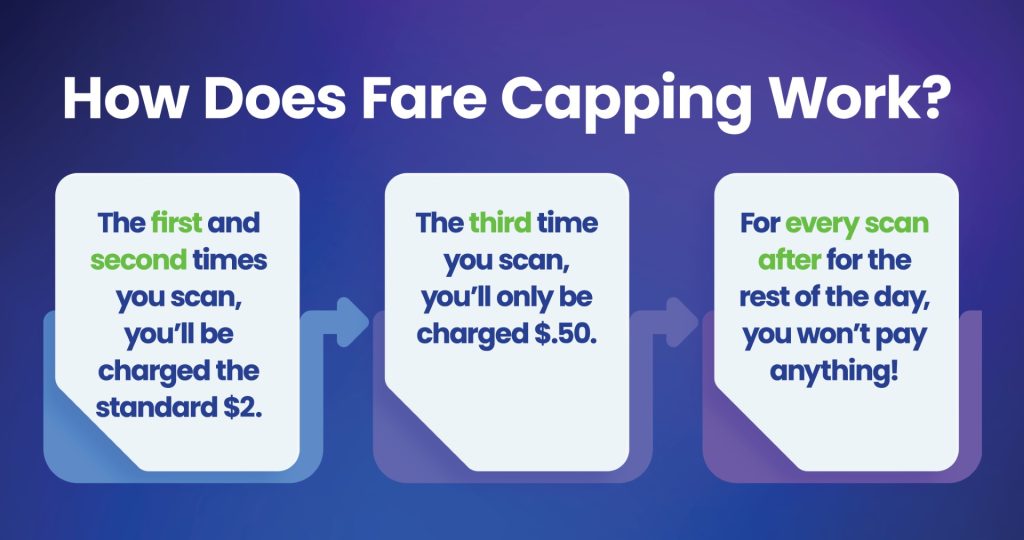
The best part? You can track your trips in the GoMobile app! Just navigate to the ‘Manage’ tab, then choose ‘Fare Capping’ under ‘More Card Actions’. The app will automatically show you how much more you need to spend before you start riding free!
Frequently Asked Questions
Your most common questions about GoMobile, answered.
- What is GoMobile?
GoMobile is the mobile fare app/system for using the following Hampton Roads Transit Services: Bus, Light Rail, Ferry. - How do I use GoMobile to ride the Light Rail?
After purchasing fare via the mobile app or at the ticket vending machine, scan your mobile device or card at the platform validator before boarding. Please show your app or card to a fare enforcement officer when requested. - Can I use my GoMobile fare for Paratransit or OnDemand Rideshare?
No, GoMobile is only available for Hampton Roads Transit’s Bus, Light Rail and Ferry services. To use Paratransit or OnDemand Rideshare, use the apps associated with those services or call our Customer Service at (757) 222-6100. - Can I use my Discounted Fare Card with GoMobile?
Yes! Discounted Fare Card holders will need to contact Customer Service to get set up within the app. Call (757) 222-6100 during operating hours to get started. - How do I add my GoPass365 or Student Freedom Pass to GoMobile?
Check back for updates! We hope to roll this out later in 2026. - Can I still use cash?
Yes! You can still use traditional cash when boarding our buses/ferries or purchasing fare at our Ticket Vending Machines. - How do I pay for multiple people?
To pay for multiple people, create a separate virtual card for each person in the GoMobile app. Load each card with any amount you want. Then, swipe and scan each card when boarding. If you run into any issues or have any questions about multiple payments, contact Customer Service.- Remember kids 17 & under always ride free with a fare-paying adult! No need to create a virtual card for them if you’re riding, too.
- How much is a ride?
Standard rides are $2 one way, $4.50 all day. All kids 17 & under ride free with a fare-paying adult. Seniors, discounted fare holders, Paratransit-eligible riders, and those with a Student Freedom Pass have their own fare. Visit our fares page to learn more about the specific types of fare. - Who do I contact with questions, comments or concerns?
Call Customer Service at (757) 222-6100 with any questions, comments or concerns.